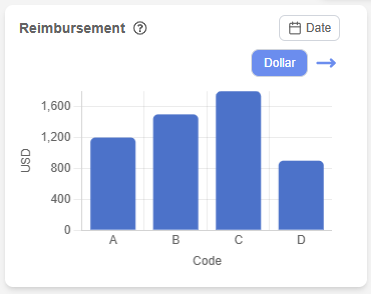
The Reimbursement Overview page provides financial insights related to patient services and billing operations.
It helps users track revenue, analyze reimbursement data, and understand billing performance.
Reimbursement Section #
The Reimbursement section visualizes financial data based on CPT (Current Procedural Terminology) codes.
Features: #
- Bar chart displaying reimbursement values
- Data categorized by CPT codes (A, B, C, D)
- Tooltip explaining CPT code meanings
- Date range filter for customized data view
Additional Behavior: #
- Displays default values when no data is available
- Allows navigation to detailed reimbursement view
This section supports financial tracking and decision-making.
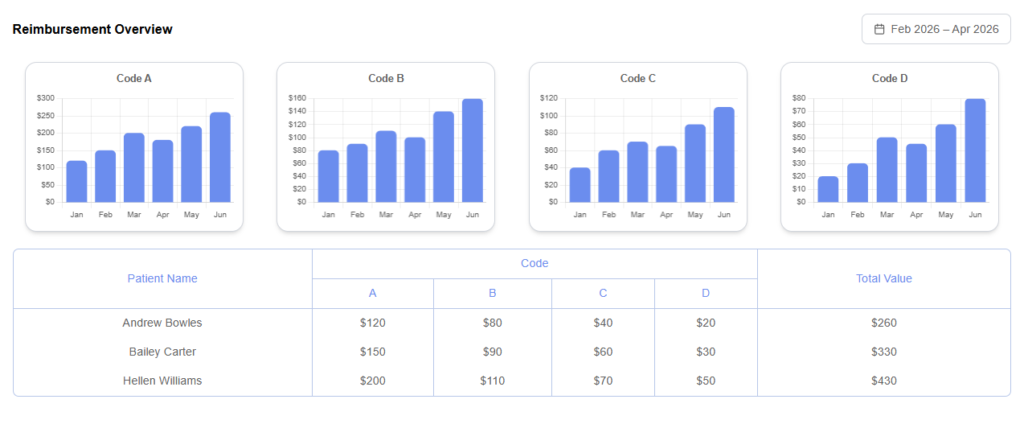
Reimbursement Overview Page #
The Reimbursement Overview page provides a detailed breakdown of financial data based on CPT codes. It includes graphical representations and tabular data to help users analyze billing performance and revenue distribution.
Navigation from Dashboard #
From the Dashboard page, users can navigate to the Reimbursement Overview page.
Behavior: #
- A navigation arrow icon is displayed in the Reimbursement section
- When the user clicks the arrow icon:
- The system redirects the user to the Reimbursement Overview page
- The redirection allows users to view:
- Detailed CPT-wise charts
- Monthly trends
- Patient-wise billing data
This interaction provides a seamless transition from summary-level data to detailed financial insights.