Patient Profile #
The Patient Profile section contains the patient’s personal and account-related information. It needs to be filled initially when patient onboards. Patients can review and update their basic details from this section.
Insurance Details #
The Insurance Details section stores insurance-related information used for billing and healthcare verification. This form can be filled through both patient and therapist side.
Physician Details #
The Physician Details section contains information about the patient’s primary and referring physicians. This form can be filled through both patient and therapist side.
Forms #
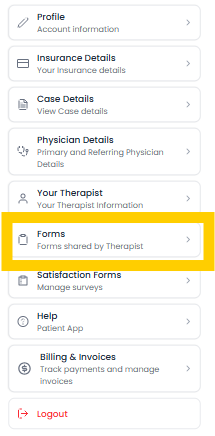
Forms section in settings are the once which are assigned to patient for there content and other policies. This form need to signed through mail received to patient on register email. Status of forms and form can be viewed through application.
Satisfaction/Survay Forms #
The Satisfaction Forms section contains survey and feedback forms shared by the therapist for the patient to complete regularly.
These forms are usually filled after completing daily exercises, therapy sessions, or assigned activities. The purpose of these surveys is to help therapists monitor:
- Patient progress
- Exercise completion
- Pain or discomfort levels
- Overall therapy experience
- Recovery improvements
Patients can open any assigned form from the list, View there details filled by them. These forms can also be filled form link received through the mail to there registered email.
Features #
- View all assigned survey forms
- Complete daily exercise feedback
- Submit recovery and satisfaction responses
- Track pending and completed forms