The Treatment Plan section is accessible from the sidebar, located above the settings option. This module is used to create, manage, and assign structured treatment plans for patients.
Overview #
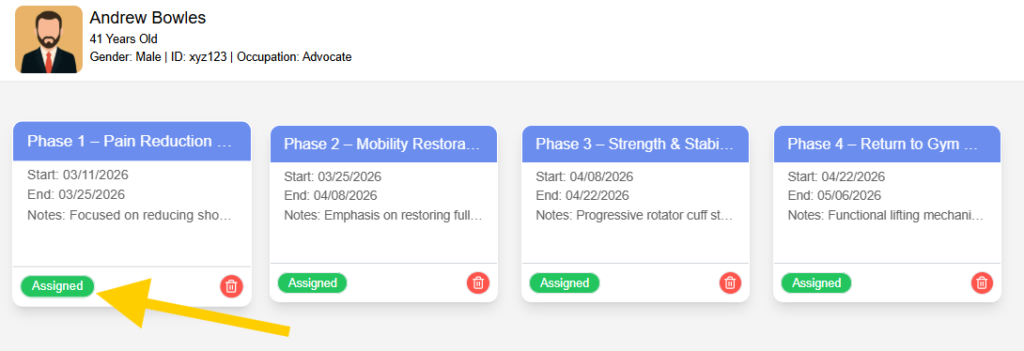
The first screen in this section displays a list of patients. When a patient is selected, their treatment plan history is shown. Each treatment plan is represented as a card, typically organized into phases .
Each plan includes key details such as start date, end date, and notes describing the focus of that phase. Exercises are assigned within each plan, forming the actionable part of the treatment.
Treatment Plan Cards #
Each treatment plan is displayed as an individual card containing:
- Plan or phase title
- Start date and end date
- Notes describing the objective of the phase
- Status indicator showing whether the plan is assigned
- Delete option to remove the plan if required
These cards provide a clear timeline of the patient’s treatment progression.
Assignment Workflow #
- By default, newly created treatment plans are marked as Not Assigned.
- When the user clicks on the assign option, a confirmation prompt is displayed.
- Upon confirmation, the system assigns the plan to the patient.
- The system automatically generates a PDF version of the treatment plan.
- This PDF includes all relevant details such as phases, notes, and assigned exercises. The generated document is sent to the patient via email.
- Once assigned, the status changes to Assigned.
This ensures that the patient has access to their treatment plan outside the system.
Summary #
The Treatment Plan module helps manage structured rehabilitation programs for patients. It allows users to create phased plans, assign exercises, and share finalized plans via email. The assignment workflow ensures that patients receive their treatment plan in a clear and accessible format.