The Treatment Plan Details page is opened when a specific treatment plan is selected. This page provides a detailed view of all exercises included in the plan along with patient feedback through submitted satisfaction forms.
Overview #
The page is divided into two main sections:
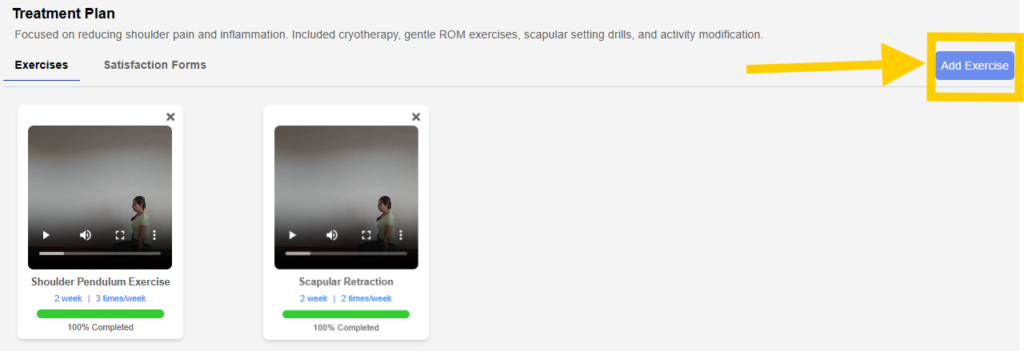
- Exercises
- Satisfaction Forms
Users can switch between these sections using tabs at the top of the page. The page also includes an “Add Exercise” option to include additional exercises in the plan.
Exercises Section #
This section displays all exercises assigned under the selected treatment plan.
Each exercise is presented as a card containing:
- Exercise title
- Video preview or thumbnail
- Duration and frequency details (for example, number of weeks and sessions per week)
- Completion status shown as a progress bar
- Percentage of completion
This helps track how consistently the patient is following the prescribed exercises.
Adding Exercises #
- If no exercises are added initially, the system provides an option to use templates.
- Templates are predefined sets of exercises created in the Treatment Template section under settings.
- Selecting a template automatically adds multiple exercises to the treatment plan.
Alternatively:
- Users can click on the “Add Exercise” button to manually search and add specific exercises.
- This allows flexibility in customizing treatment plans based on patient needs.
Managing Exercises #
- Exercises can be removed from the plan if required.
- Progress updates are reflected based on patient activity in the patient application.
Satisfaction Forms Section #
This section displays survey forms submitted by the patient through the patient application.
The table includes the following details:
- Sequence number of the form
- Date when the form was sent
- Date when the patient submitted the form
- Status of the form (Submitted or Not Submitted)
- Option to view the submitted form
This helps track patient feedback and engagement during the treatment process.
Summary #
The Treatment Plan Details page provides a comprehensive view of assigned exercises and patient feedback. It allows users to add exercises through templates or manual selection and monitor patient progress and engagement through completion tracking and submitted forms.