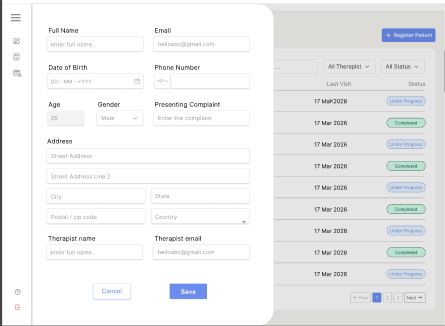
The Add Patient module allows receptionists to register new patients and assign therapists directly from the system.
Add Patient Form #
The receptionist can add patient details using the Add Patient sliding form panel.
Required Information Includes:
- Full Name
- Date of Birth
- Phone Number
- Presenting Complaint
- Gender
- Occupation
- Address Details
- Assigned Therapist
The system also automatically calculates patient age from the selected date of birth.
Address Management #
The form supports dynamic location selection.
Features:
- Country selection
- State selection
- City selection
- ZIP code validation
- Auto location fetch using ZIP code
This helps maintain accurate patient address information.
Therapist Assignment #
Receptionists can assign therapists while creating the patient.
Features:
- Therapist dropdown list
- Therapist name and email display
- Required therapist assignment validation
This ensures patients are linked to the correct therapist during registration.
Submission #
After successful submission:
- Patient is added to the system
- Success notification is displayed
- User is redirected to the Patients List page
This ensures proper and secure patient registration workflow.