The Document Templates section allows users to create, manage, and reuse predefined document templates within the system.
These templates help standardize documentation workflows and reduce repetitive manual document creation.
Template List #
The page displays all available document templates in a card-based layout.
Information Displayed: #
- Template Title
- Template Description
Each template card includes options to view or delete the template.
Create Document Template #
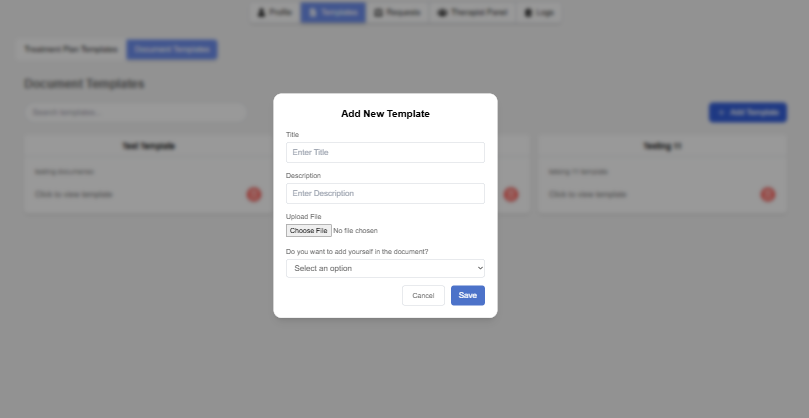
Users can create new document templates using the Add Template button.
Required Information: #
- Template Title
- Template Description
- PDF File Upload
- Therapist Placement Selection
Therapist Placement Options: #
- Yes
- No
The therapist placement option allows users to decide whether therapist information should automatically appear inside the document.
Supported File Type: #
- PDF Documents Only
This feature allows therapists to upload reusable consent forms and documentation files for future patient assignments.usable consent forms and documentation files.
Delete Template #
Users can delete templates directly from the template card.
Features: #
- Delete confirmation popup
- Prevents accidental deletion
- Demo templates cannot be deleted
This ensures secure document management.
Template Editing Interface #
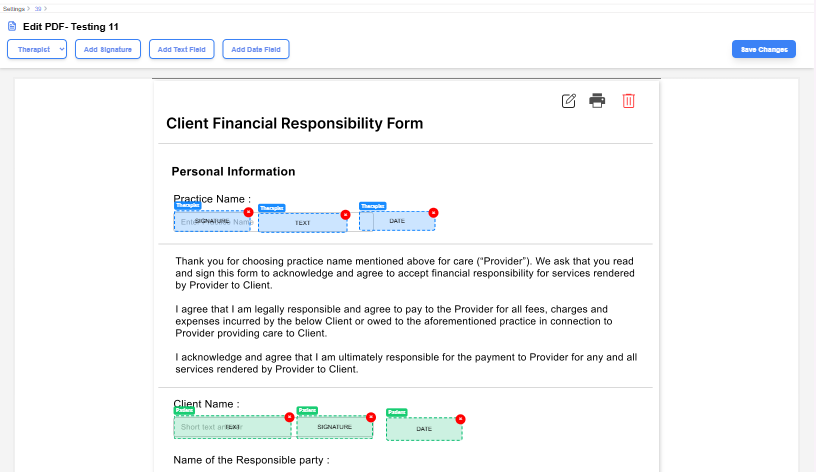
The editor opens when a user selects “Click to view template” from the Document Templates section.
The editor allows users to customize PDF documents before assigning them to patients.
Features: #
- PDF document preview
- Interactive editing toolbar
- Recipient selection:
- Patient
- Therapist
- Drag-and-drop field placement
- Real-time field positioning
Supported Field Types: #
- Signature Field
- Text Field
- Date Field
Field Management: #
- Click-to-place functionality
- Draggable fields
- Resizable field areas
- Move fields
- Delete fields
- Save field positions
Fields can be placed anywhere within the PDF document, allowing users to create flexible and customizable consent forms and documentation workflows.
Save Changes #
The editor includes a Save Changes option to store field configurations.
Behavior: #
- Saves all newly added fields
- Updates document field positions
- Stores recipient-specific field assignments
This ensures templates are ready for future use.