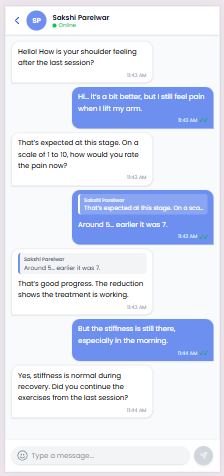
The Chat page allows patients to communicate with their therapist in real time using the XMPP messaging system. Users can send messages, receive replies, view therapist online status, and track message delivery updates.
Initial State #
When the page loads, the system:
- Initializes XMPP chat connection
- Fetches therapist profile information
- Loads chat messages
- Syncs therapist online/offline presence
- Automatically scrolls to the latest message
A back button is also available for navigation.
Therapist Information #
The top header displays:
- Therapist name
- Therapist initials avatar
- Online/Offline status
- Typing indicator
This helps users identify therapist availability during conversations.
Messaging Features #
The chat system supports:
- Real-time message sending and receiving
- Reply to specific messages
- Swipe-to-reply support on mobile
- Emoji picker integration
- Auto message scrolling
Messages are displayed separately for patient and therapist conversations.
Message Status Handling #
Each message supports delivery tracking.
Supported Status:
- Sent
- Delivered
- Seen
Unread therapist messages are automatically marked as seen when the chat page is opened.
Message Input Section #
The bottom input area allows users to:
- Type messages
- Send messages using Enter key
- Use emoji picker
- Trigger typing indicators
The send button remains disabled for empty messages.