The Treatment Plan module helps patients view their assigned treatment plans, access daily exercises, complete workout sessions, and submit feedback after exercises.
Treatment Plan Page #
The Treatment Plan page displays all patient treatment plans.
Features:
- Active treatment plan section
- Other treatment plans section
- Treatment progress percentage
- Thumbnail preview support
- Vimeo video thumbnail support
Behavior:
- Clicking the Active Plan redirects the user to the Exercise List page
- If no plans exist, an empty state message is displayed
This page acts as the main entry point for patient exercises.
Exercise List Page #
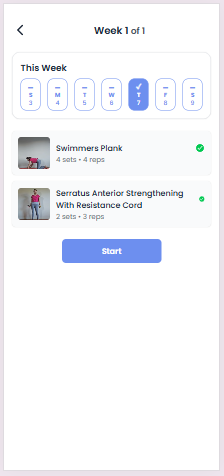
The Exercise List page displays weekly exercises for the selected treatment plan.
Features:
- Weekly exercise tracker
- Current day auto-selection
- Exercise completion indicators
- Daily exercise list
- Start workout button
- Week progress visualization
Exercise Status Indicators:
- ✓ → Completed
- – → Not Started
Behavior:
- Users can only start exercises assigned for the current day
- Clicking Start redirects the user to the Exercise Detail page
- Completed exercises display success indicators
This page helps patients manage their day-wise workout schedule.
Exercise Detail Page #
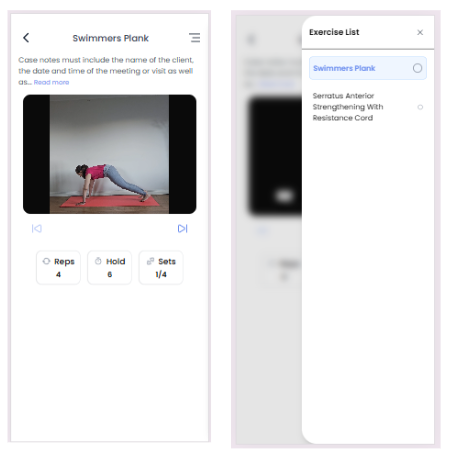
The Exercise Detail page provides complete workout execution functionality.
Features:
- Exercise video playback
- Vimeo and MP4 video support
- Sets, reps, and hold timer display
- Exercise navigation controls
- Countdown before next exercise
- Exercise progress tracking
- Exercise side panel list
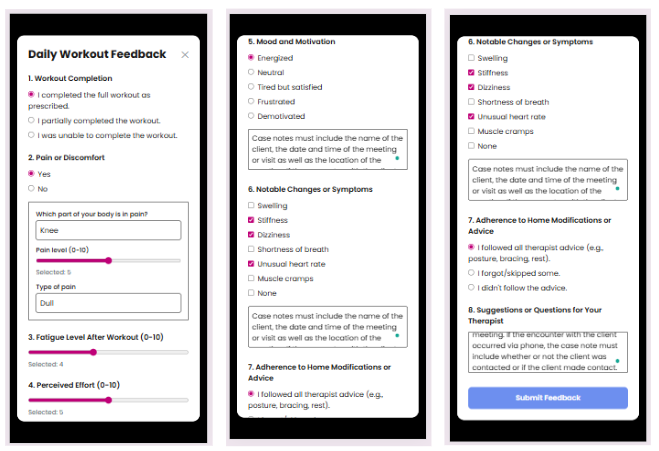
- Daily feedback submission form
Behavior:
- Users can move between exercises
- Progress is automatically updated after completing sets
- Final exercise completion opens the feedback form
- Submitted feedback is saved to the backend
- After feedback submission, users are redirected back to the Treatment Plan page
This page allows patients to perform and track their assigned exercises step-by-step.