The application layout is structured with two primary navigation components: the Sidebar and the Top Navbar. These elements provide access to all major modules and actions within the system, ensuring smooth navigation and usability.
Sidebar Navigation #
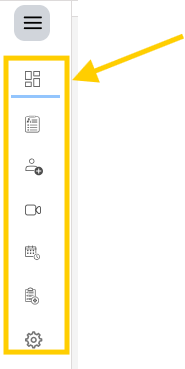
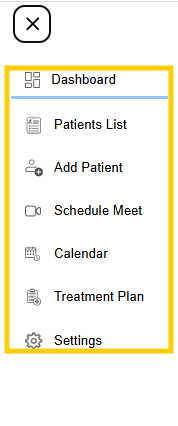
The sidebar is located on the left side of the application and serves as the main navigation panel. It contains icons and labels representing different modules of the system.
Key Features #
- Displays a vertical list of icons representing modules
- Provides quick access to core functionalities
- Remains consistent across all pages
Common Sections in Sidebar
- Dashboard
Provides an overview of system activity and key metrics - Patient Module
Used to manage patient records, profiles, and related data - Session Module
Used for scheduling and managing meetings or therapy sessions - Treatment Module
Used to create and manage treatment plans and exercises - Reports or Documents
Used for accessing generated reports and patient documents - Settings
Used to configure system preferences, templates, and other administrative options
Summary #
The sidebar and top navbar form the core navigation structure of the application. The sidebar enables movement between different modules, while the top navbar provides quick access to notifications, communication tools, and user account controls. Together, they ensure an organized and user-friendly interface for managing all application features.